You have spent the last 8 to 12 months waking up at 5:00 AM, memorizing general awareness notes, solving thousands of quantitative aptitude problems, and taking grueling full-length mock tests.
You open the Staff Selection Commission (SSC) or Union Public Service Commission (UPSC) portal on the day of admit card release, heart pounding with anticipation. But instead of your roll number and examination venue, a cold, red status message appears on your screen:
"APPLICATION STATUS: REJECTED — REASON: INVALID / DEFECTIVE PHOTOGRAPH OR SIGNATURE"
In an instant, an entire year of sacrifice, coaching fees, and mental dedication dissolves into despair. There are no re-examinations, no second chances, and no helpline agents who can reverse the decision.
Every year across India, more than 3,50,000 candidates have their application forms summarily rejected by boards like SSC (CGL, CHSL, MTS, GD), UPSC, IBPS, and Railway Recruitment Boards (RRB) exclusively due to trivial, avoidable mistakes in their uploaded photographs and signatures.
In 2026, government recruitment boards have transitioned to automated computer-vision AI validation engines. Human clerks no longer manually review each picture; automated software scans your upload pixel-by-pixel for facial landmark ratios, glare, background color hue, and file size compliance. If your image breaches even one technical constraint by 0.5 kilobytes or 2 millimeters, the algorithm automatically invalidates your candidature.
Here is the authoritative 2026 survival guide: the top 7 fatal upload mistakes, official board dimension benchmarks, and how to format your files flawlessly in seconds.
The 2026 Reality: Why Automated Gatekeepers Reject Forms
In previous years, thousands of candidates slipped through with slightly cropped selfies or dim lighting because manual scrutiny was overwhelmed by millions of applicants.
In 2026, portals enforce automated gatekeeping algorithms that analyze:
- Facial Landmark Geometry: Software checks that your eyes, nose, and mouth occupy at least 70% to 80% of the vertical frame.
- Background Uniformity: The background must match a strict luminance threshold (pure off-white or light grey). Shadows cast on walls immediately trigger rejection.
- Strict Byte-Level File Caps: If a portal stipulates
Maximum 50.0 KB, a file measuring50.1 KB (51,302 bytes)will be rejected by the portal upload script before submission.
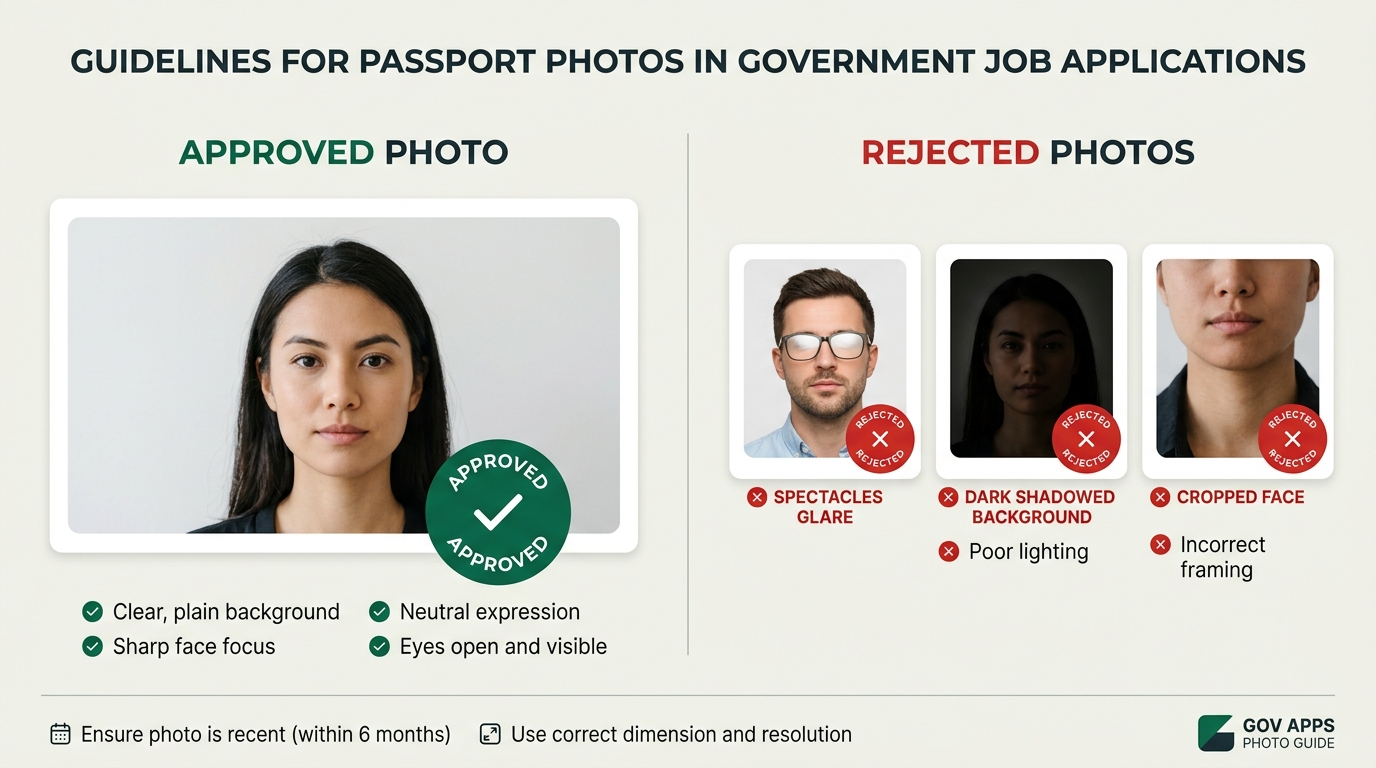
The 7 Fatal Upload Mistakes That Cancel Your Application
Understanding these exact failure points is your guarantee that your admit card will be released on time.
1. Wearing Spectacles or Reading Glasses (The #1 Rejection Trap)
This is the single most common reason for mass rejections in SSC CGL and CHSL notifications:
[!WARNING] SSC & UPSC Official Directive: "Photographs with spectacles, goggles, or tinted glasses are NOT permitted, even if the candidate wears prescription glasses on a daily basis."
When flash or ambient light hits glass lenses, it creates micro-reflections or glare that obscure your pupil boundary. Computer vision software cannot verify your retinal landmarks, causing immediate automated disqualification. Always remove your glasses completely when taking your exam photo.
2. Shadows and Dark / Cluttered Backgrounds
Many candidates stand against a colored bedroom wall, curtain, or door. Camera flash creates a dark, distinct silhouette shadow behind the head.
- The Rule: The background must be completely neutral, plain white, or light grey with zero patterns, texture, or shadows.
- The Pitfall: If there is a light source above your head casting a shadow under your chin or across your cheeks, the contrast balance fails verification.
3. Tilted Head Angles & Lateral Profiles
Recruitment boards require a strict frontal passport pose:
- Both ears must be clearly visible and aligned horizontally.
- The face must look directly into the camera lens with a neutral expression (no wide grins, no frowning, mouth closed).
- Candidate selfies taken from a high angle or tilted lateral headshots are categorized as "Irregular Orientation" and cancelled instantly.
4. Distorted Aspect Ratio (The "Squished Face" Syndrome)
When applicants try to manually resize images using basic mobile gallery apps, they often drag corners without locking the aspect ratio. This compresses the face horizontally (making the head look unnaturally tall and thin) or stretches it vertically.
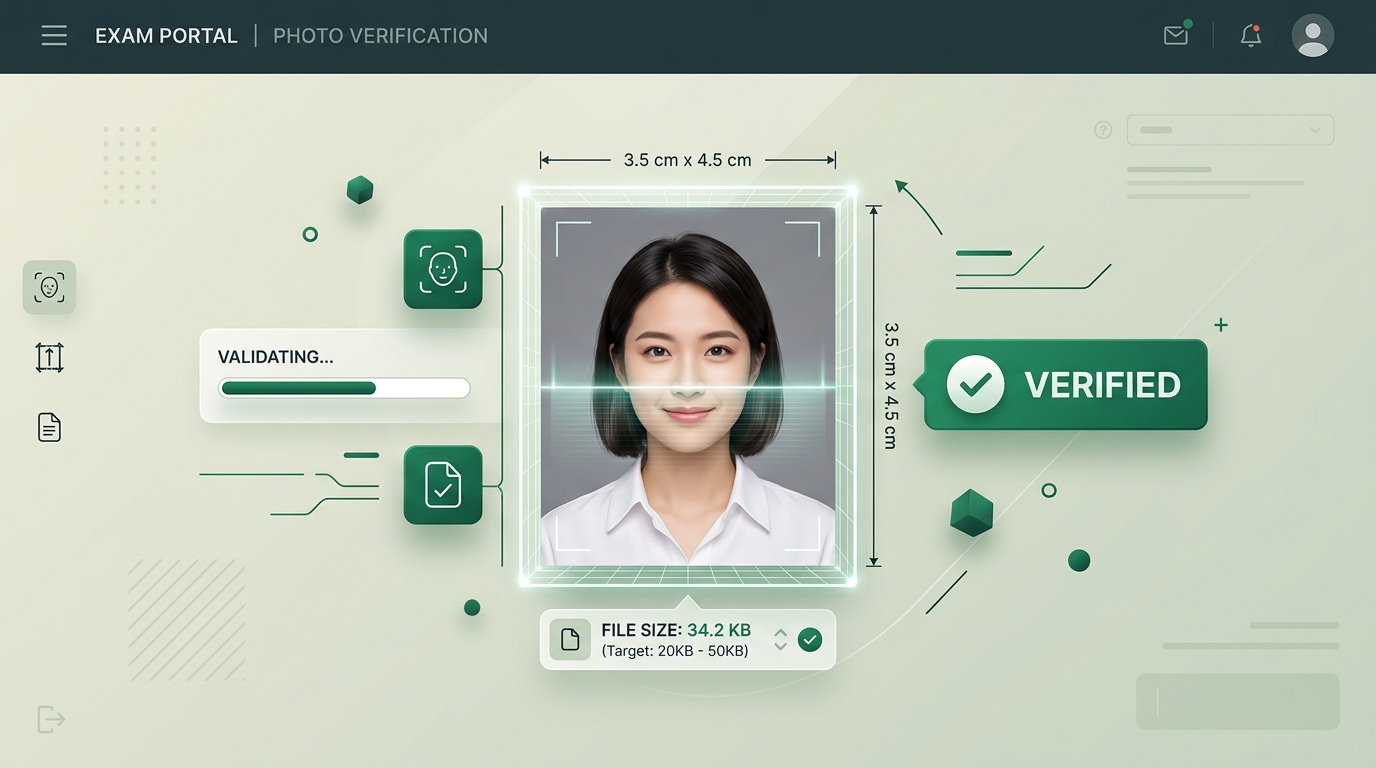
- Government portals verify the geometric ratio: Width to Height must be strictly 3.5 cm to 4.5 cm (an aspect ratio of 7:9 or approximately 1:1.28).
5. Blurry Signature on Ruled or Lined Paper
Never sign on notebook paper with printed blue or black lines.
- Signatures must be executed with a dark black or blue ballpoint/gel pen on plain, unruled, pure white photocopy paper.
- Taking a photo of your signature with a smartphone often results in a yellowish, dim background with weak contrast. Recruitment boards require high-contrast binarization: the ink must be crisp and the paper 100% white.
6. File Size Exceeding or Falling Below Prescribed KB Limits
Every board enforces rigid lower and upper bounds:
- Photo: Strictly between 20.0 KB and 50.0 KB. If your photo is 18.5 KB, the system rejects it as "Low Quality". If it is 51.2 KB, the system rejects it as "Over Size".
- Signature: Strictly between 10.0 KB and 20.0 KB. A signature at 9.8 KB or 20.4 KB will fail validation.
7. Caps, Hats, Mufflers, and Religious Headwear Encroachment
Caps, baseball hats, beanies, and decorative scarves are strictly banned. While religious turbans and hijabs are permitted, they must never encroach on the facial oval: your forehead, eyebrows, eyes, nose, cheeks, and chin must be 100% unobstructed from hairline to jawline.
Official 2026 Dimension & File Size Matrix
Before uploading any document, compare your files against this definitive recruitment board benchmark:
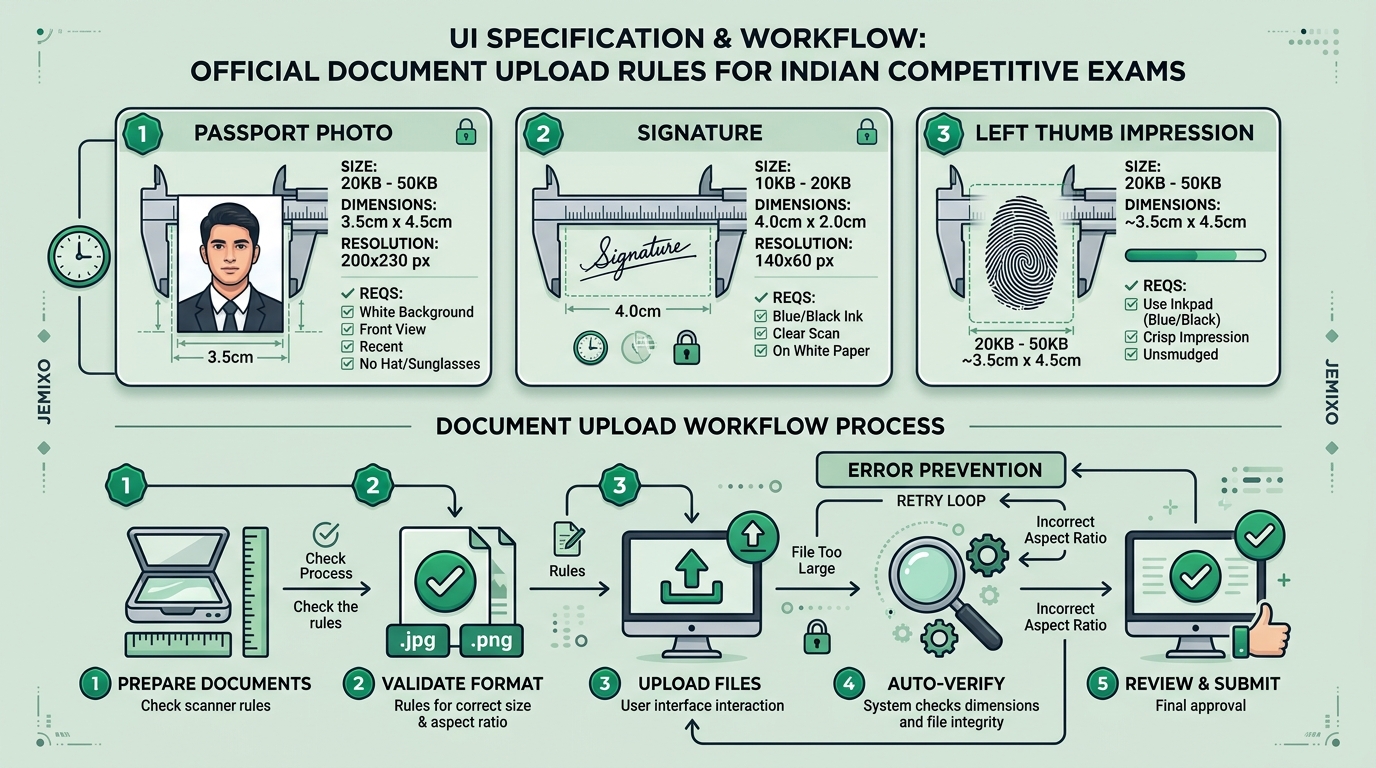
| Recruitment Board | Photo Size (KB) | Photo Dimensions | Signature Size (KB) | Signature Dimensions | Special Notes |
|---|---|---|---|---|---|
| SSC (CGL, CHSL, MTS, GD) | 20 KB – 50 KB | 3.5 cm × 4.5 cm (200 × 230 px) | 10 KB – 20 KB | 4.0 cm × 2.0 cm (140 × 60 px) | Strictly no glasses/spectacles. Live camera on SSC App must have white backdrop. |
| UPSC (CSE, NDA, CDS) | 20 KB – 300 KB | 3.5 cm × 4.5 cm (350 × 350 px min) | 20 KB – 300 KB | 3.5 cm × 1.5 cm (1000 × 1000 px max) | Photo must not be more than 10 days old. Name and date on photo required if notification specifies. |
| IBPS & SBI (Banking) | 20 KB – 50 KB | 4.5 cm × 3.5 cm (200 × 230 px) | 10 KB – 20 KB | 3.0 cm × 1.5 cm (140 × 60 px) | Black ink preferred for sign. Left Thumb Impression (LTI) required between 20KB–50KB. |
| Railway (RRB NTPC, Group D) | 20 KB – 50 KB | 3.5 cm × 4.5 cm (320 × 240 px) | 10 KB – 20 KB | 4.0 cm × 2.0 cm (140 × 60 px) | Color photograph with white background. Signature in capital letters is rejected. |
| State Police & PSCs | 20 KB – 50 KB | 3.5 cm × 4.5 cm (200 × 230 px) | 10 KB – 20 KB | 4.0 cm × 2.0 cm (140 × 60 px) | Clear frontal portrait with 80% face coverage. |
Step-by-Step Fix: How to Resize Photo & Sign to Exact 20KB–50KB Online
You do not need Adobe Photoshop, expensive cyber cafe visits, or dubious third-party Android apps loaded with intrusive banner ads.
You can format your photograph and signature in under 5 seconds using Jemixo's 100% free, on-device browser utility:
Step 1: Open Jemixo Govt Exam Photo Resizer
Navigate to Jemixo Exam Photo & Signature Resizer. It runs completely client-side inside your browser—meaning your photo is never uploaded to any cloud server.
Step 2: Select Your Exam Preset
Choose your specific recruitment notification from the dropdown:
- SSC Photo (20 KB – 50 KB, 3.5 × 4.5 cm)
- SSC Signature (10 KB – 20 KB)
- UPSC Photo / Signature
- IBPS Bank Photo / Sign / Left Thumb Impression
Step 3: Upload and Download
Drop your smartphone photo. Our smart binary-search canvas compression algorithm iteratively optimizes the JPEG quality matrix until the file lands precisely at the sweet spot (e.g., 34.5 KB)—preserving razor-sharp facial details while guaranteeing acceptance by the portal.
What to Do If Your SSC Form Was Rejected (Can You Appeal?)
If the application deadline has passed and your application status reads "Rejected":
- Monitor the Official Correction Window: Boards like SSC and State PSCs usually open a 2 to 3-day Application Form Correction Window approximately 15 to 20 days after registration closes. Candidates are permitted to re-upload their photograph and signature by paying a nominal correction fee (typically ₹200 for the first correction).
- Submit a Grievance on the Centralized Portal: If you believe your photograph was 100% compliant and rejected erroneously by an automated glitch, lodge an urgent representation on the CPGRAMS (Centralised Public Grievance Redress and Monitoring System) portal with your registration number, original uncompressed image file, and proof of camera EXIF date.
- Never Wait Until the Final Registration Hour: Server traffic surges during the last 48 hours of any recruitment drive cause image compression scripts to time out. Always submit your validated files at least 5 days prior to the deadline.
Frequently Asked Questions (FAQ)
Can I wear spectacles if I have high cylindrical eye power?
No. Both the Staff Selection Commission (SSC) and UPSC have explicitly updated their instructions stating that no eyeglasses of any type (clear or tinted) are permitted in uploaded photographs. If spectacles are detected, the application will be cancelled without exception. You may wear your glasses inside the physical exam center.
Is a white background strictly mandatory?
Yes. Official notification guidelines explicitly state that the background must be a light, neutral color, with pure white or light grey preferred. Photos taken against colorful wallpaper, red bricks, nature backdrops, or vehicles will fail automated screening.
Can I sign in all capital (BLOCK) letters?
No. Signatures written entirely in capital block letters (e.g., RAHUL SHARMA) are routinely rejected by SSC, Banking IBPS, and Railway boards. Your signature must be in your natural running cursive handwriting.
How old can my photograph be?
Under updated 2026 recruitment norms, candidate photographs must not be more than 3 months old (or within 10 days for select UPSC drives) from the date of notification publication. If your appearance on the exam day does not match your uploaded photograph, biometric facial verification at the test center gate will be flagged.
Protect Your Hard Work: Final Pre-Submission Checklist
Before you hit the final "Submit Application" button on any government examination portal, run this 30-second checklist:
- Spectacles Removed: Photo taken with bare eyes, zero lens glare.
- Background Neutral: Plain white backdrop with no shadow cast behind head or ears.
- Photo File Size: Between 20.0 KB and 50.0 KB (tested on Jemixo Resizer).
- Signature File Size: Between 10.0 KB and 20.0 KB on clean unruled white paper.
- Aspect Ratio Locked: 3.5 cm width by 4.5 cm height without horizontal or vertical stretching.
- Mobile Document Scanner: For crystal-clear physical document scanning on your smartphone, use Jemixo Scanner & AI for 100% offline edge cropping.
Your preparation deserves to be tested in the examination hall—not eliminated at the upload screen. Format with precision, prepare with confidence, and secure your career in 2026!